My Personal Assistant
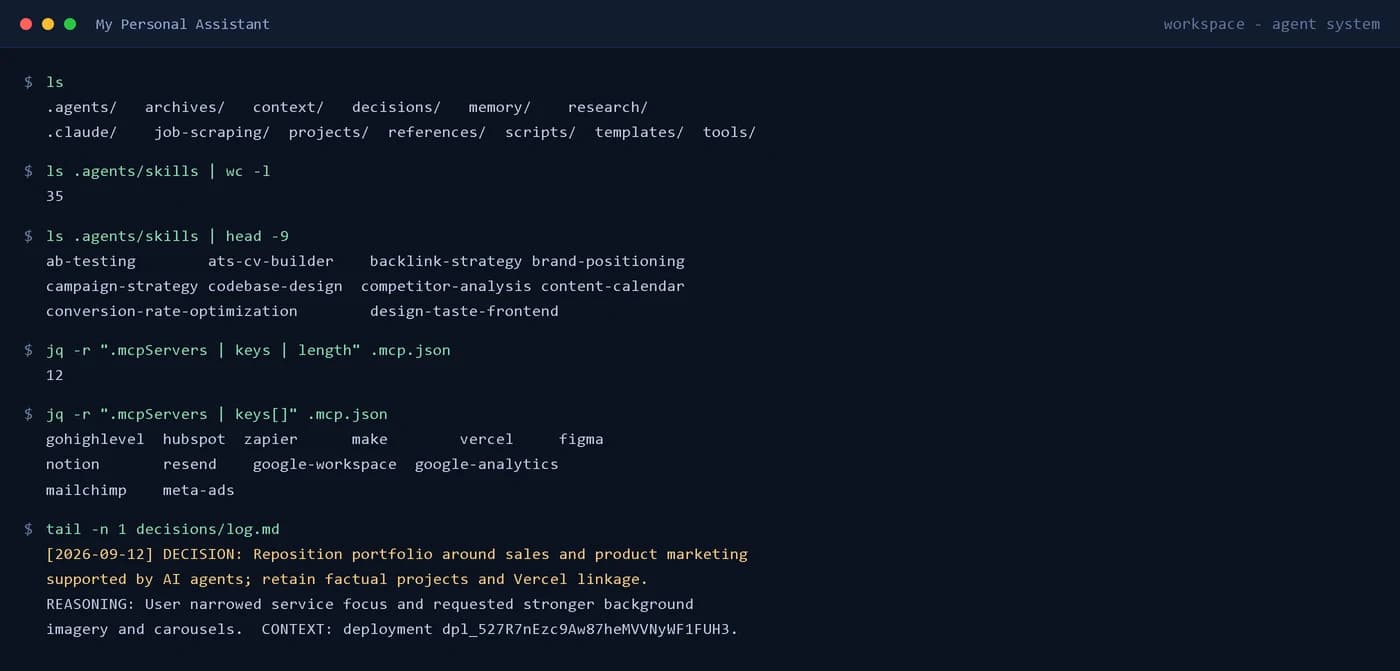
A local, Git-versioned agentic AI workspace: instruction files define how the agent operates, 35 reusable skills encode repeatable procedures, MCP integrations give it live access to external tools, and a persistent memory and decision log carry context across sessions.
The problem
General AI assistants are stateless in the ways that matter. They can write well in the moment, but they do not remember why a decision was made, they do not know which of my own procedures already exist, and they re-derive the same context every time a task restarts.
That cost shows up in real work. Re-running a job search means rebuilding the same scripts, a deployment means re-explaining the stack, and a recurring task gets solved from scratch rather than from a procedure that was already written and improved.
System objective
Build one workspace that holds my operating context, my reusable procedures and my live tool access in a form that is inspectable, versioned and reusable — so the system improves each time a task is done, instead of resetting.
- Instructions and context live in files, so behaviour is reviewable and diffable rather than hidden in a settings screen.
- Recurring work becomes a named, versioned skill instead of a fresh improvisation.
- Project work is isolated per project while shared procedures stay available across all of them.
- Every meaningful change is committed, so the system can be rolled back or audited.
How it is actually used
This is a personal operating system rather than a product with external users. It is used every day, on real client and product work.
- Software development — reading a codebase, planning a change, implementing it, and running lint, type checks and production builds before anything ships.
- Research and client work — market and competitor research, live web search, and background on a client's business before a proposal.
- Client delivery — CVs, proposals, campaign plans and client-facing documents generated from templates and tracked to the client.
- Job research — automated discovery and filtering of remote marketing roles, synced into a Google Docs tracker.
- Business operations — CRM and email platform work through GoHighLevel, HubSpot and Zapier, with the agent able to read and act rather than only advise.
System architecture
The workspace is layered. An instruction layer (AGENTS.md and CLAUDE.md) sets the agent's role, priorities and rules. A skill layer holds 35 named procedures, each a folder with a SKILL.md and, where the procedure needs it, executable scripts, reference material and templates. A tool layer exposes live external services. A memory layer persists context, decisions and activity. Project work lives in its own sub-workspaces with their own READMEs.
- Instruction layer — AGENTS.md and CLAUDE.md define the agent's role, the business context it works against, the decision log format and the archives rule that nothing is ever deleted.
- Skill layer — 35 skills covering frontend design, code architecture, Supabase and Postgres practice, Playwright testing, SEO audits, campaign strategy, paid media, conversion optimisation and technical writing. A skill is a folder: SKILL.md plus scripts, references, templates and assets where the procedure requires them. The same 35 are mirrored into the Claude skill surface so the procedures load the same way in either agent environment.
- Tool layer — twelve MCP integrations connect GoHighLevel, HubSpot, Zapier, Make.com, Vercel, Figma, Notion, Resend, Google Workspace, Google Analytics, Mailchimp and Meta Ads, so the agent can act in real systems instead of only describing what to do.
- Script layer — custom tooling written for real jobs: a PowerShell module that fixes argument mangling when calling the Google Workspace CLI on Windows, a Node job-scraper that pulls and filters remote marketing roles from the Remotive API and the We Work Remotely feed, and scripts that sync the results into Google Docs.
- Memory layer — context files for identity, work, team, priorities and goals; an append-only decision log; and activity, preference and project-status records that survive between sessions.
- Project layer — every product I am building lives in its own sub-workspace with a README, its own conventions and its own Git history.
Key features
- Persistent context and memoryIdentity, business context, current priorities and goals are stored as files and reloaded each session. Decisions are appended to a log that is never rewritten, so the reasoning behind a choice stays available after the conversation ends.
- 35 reusable skillsRecurring work is captured as a named procedure with a definition of when it applies and how to execute it. Frontend design, codebase architecture, Supabase practice, Playwright testing, SEO audits, paid media setup, campaign strategy, funnel design and technical writing are all encoded this way and improved each time they are used.
- Live tool integrationsThrough twelve MCP integrations, the agent reaches external services directly — CRM and email platforms, ad accounts, design files, deployment and transactional email — so a task can be carried through to completion instead of stopping at advice.
- Purpose-built scriptsWhere an integration was unreliable, the gap was filled with real code: a PowerShell module that passes exact argument arrays to the Google Workspace CLI so quoted JSON survives PowerShell 5.1, and a Node scraper that pulls remote marketing roles and filters them by keyword and location.
- Per-project isolationEach product — RevenuePilot, DE-RANGER, this portfolio, the Scientific Research Assistant — lives in its own sub-workspace with its own README, conventions and history, while shared skills stay available across all of them.
- Versioned and recoverableThe whole workspace is a Git repository. Every instruction, skill and script change is a reviewable commit, so a procedure that turns out to be wrong can be corrected and the previous version recovered.
How it was built
The design principle was that anything worth repeating should become an artifact, and anything that changes the business should leave a record. That produced a workspace made of plain files rather than a tool configured through a UI.
- Files over settings — instructions, context and skills are Markdown in Git, so they are reviewable, diffable and restorable, and they do not depend on a vendor's export function to survive.
- Skills earned, not assumed — a procedure is only written once the same request has come up more than once. The backlog of candidate skills is tracked separately from the built ones.
- Skills carry their own machinery — a skill folder can hold executable scripts, reference docs, templates and design assets, so a procedure is runnable rather than descriptive.
- Repair the integration, do not work around it — where an API or CLI was unreliable, the fix was written down as a reusable module instead of repeated as a manual workaround.
- Append-only history — the decision log and the activity log are never edited after the fact, so the history of the work is genuinely the record of it.
Notable constraints
The system is deliberately honest about its own reliability and about the limits of what an agent should be trusted with.
- Secrets are read from the environment or a gitignored file at runtime and never committed. Credentials exist outside the versioned workspace.
- Consequential work keeps a human in the loop — the system prepares, drafts and executes reversible steps, and does not present an unreviewed action as a decision already taken.
- Knowledge is externalised as instructions and skills, so the capability survives the underlying model and is not locked to one vendor.
- Nothing is deleted. Superseded material is archived, which is why the workspace carries archives alongside the live system.
How a task runs through the system
- 01 — Load contextIdentity, work, priorities, goals
- 02 — Route the requestMeta command, capture, or capability
- 03 — Select a skillReusable procedure, loaded on demand
- 04 — Call a toolMCP integration or local script
- 05 — Act in the real systemCRM, Workspace, deployment, code
- 06 — Record the decisionAppend-only decision log
- 07 — Log the activityMemory and project status
- 08 — CommitGit version of the change
Current status
The workspace is in active daily use, and every product listed in this portfolio — including this site — is built inside it.
35 skills are built with a further backlog tracked separately. Tool integrations are configured and in use. No autonomous-operation claim is made: it is a tool-using agentic system that plans, calls tools, acts in real systems and records what it did, with a person responsible for the outcome.
Delivery status
- CompleteInstruction & operating-model layer
- Complete35 reusable skills authored
- Complete12 MCP tool integrations configured
- CompletePersistent context & memory files
- CompleteAppend-only decision log
- CompletePowerShell Google Workspace module
- CompleteNode.js job-research scraper & sync
- CompletePer-project sub-workspaces
- CompleteGit versioning of the whole workspace
- PendingFurther skills from the tracked backlog